
 Nyno
Nyno
Nyno helps people build better AI Frontend apps, exclusively with EU-AI without having to write backend code.
Example video:
Overspending on EU-AI or want to prevent wasting weeks of valuable time on backends?
- 💙 What if you didn't have to worry about the backend at all?
- 🩵 What if there was a better and simpler EU-AI core "language"?
- 🇪🇺 What if you didn't have to worry so much about sovereignty, licensing, GDPR or not "buying from Europe", because all our workflows nodes are actually local or European, and our license is 100% commercial API friendly & open-source?
Overspending on EU-AI projects starts with one innocent decision: Your EU-AI Core Language
Should you start a new project from scratch, with Python? Or even with a framework?
Well, you could, but most Python frameworks make workflows harder to change later.
Should you use an agentic harness?
Well you could, but agentic harnesses make workflows harder to control + more expensive to run.
The overall result is the same for both paths: Loss of control over your AI usage.
"Simplicity is the ultimate sophistication"
So what if you kept your AI workflows simple, for example using a special yet simple language?
What if simplicity indeed is truly "the ultimate sophistication"?
What if simplicity indeed leads you to waste less tokens, time and money?
Quick Comparison: Coding EU-AI backends from scratch VS Nyno
Python backend (100+ lines of code):
# lots of imports
import fastapi
import json
import bcrypt
# import ..
# its keeps going 😭

# actual business logic
## db
## auth
## crypto
## envs
## api configuration
## api routes

## your first workflow
## (even more configuration 😭) 
Nyno (<10 lines):
You can ONE-SHOT AI with 3 lines:
workflow:
  - step: ai-mistral-text
    args: ['your prompt']
Or use past chat history as well:
context:
  MISTRAL_MESSAGES: [..] # past messages
workflow:
  - step: ai-mistral-text
    args: ['your prompt']
Or even past history with more steps:
context:
  MISTRAL_MESSAGES: [..] # past messages
workflow:
  - step: ai-mistral-text
    args: ['your prompt']
workflow:
  - step: ..
Nyno: Build Your First EU-AI Workflow < 20min
Install and Start Nyno:
mkdir -p {pgdata,workflows-enabled}

podman run -d \
-p 9057:9057 \
-v ./pgdata:/nyno/pgdata \
-v ./workflows-enabled:/nyno/workflows-enabled \
rg.fr-par.scw.cloud/flowagi/nyno:latest
(On Windows or Mac? See our Docker Desktop install guide or request early access for the platform):
-
Get your Mistral API key: https://console.mistral.ai.
-
Open Nyno http://localhost:9057.
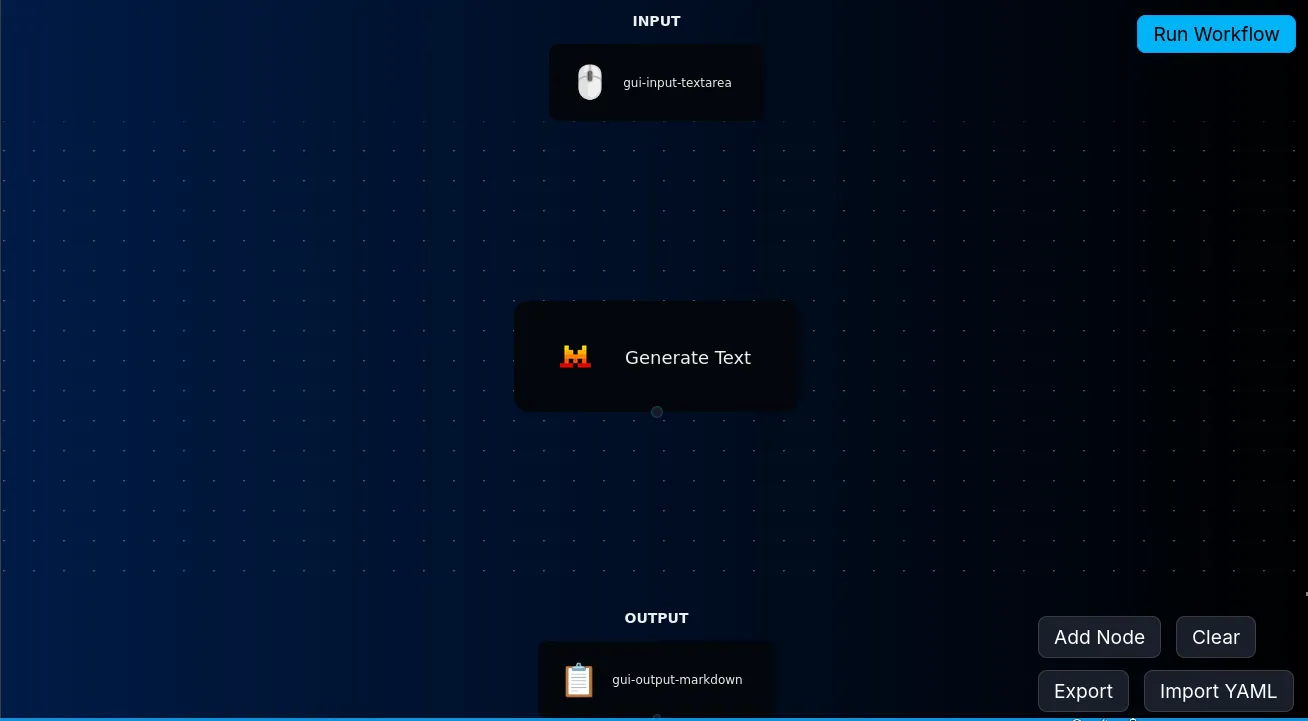
- Build and test your workflow using Run Workflow.
- Export it as a
.nynofile.
3 Steps to Connect Nyno to Your Frontend
Build secure EU-AI applications without writing (and constantly rewriting) backend code.
- Enable your workflow by copying the
.nynofile into theworkflows-enabledfolder.
cp ~/Downloads/flow.nyno ~/nyno/workflows-enabled/Please note for EU-AI: you will need to add your MISTRAL_API_KEY context variable to the file like:
context:
  MISTRAL_API_KEY: "Your-Key"
workflow:
- step: ...- Create a workflow user with a single backend call.
curl -X POST "http://localhost:9057/api/v1/users" -H "Authorization: change_me" -d "{\"email\":\"john@example.com\",\"password\":\"my-secure-password\"}"- Call your workflow from the frontend.
fetch("http://localhost:9057/api/v1/flow.nyno", {
  method: "POST",
  headers: {
    Authorization: "Basic " + btoa("john@example.com:my-secure-password")
  },
  body: JSON.stringify({
    prev: "Hello, can you summarize this text?"
  })
})
  .then(r => r.json())
  .then(console.log);
Security note: "API_" keys are automatically masked ****. Just make sure to [!] change the default change_me secret in envs/ports.conf when you're deploying to prevent arbitrary workflow execution and account creation.
For More Nyno + EU-AI Communities
- You can find us on Reddit /r/Nyno
- Main Site/Docs/Platform Early Access: https://nyno.dev
- Email Nyno's creator "MJ" at (first 2 letters)@nyno.dev
- Latest EU-AI news: /r/euainews