 Nyno
Nyno
Workflow Context & Variable Passing
This document explains how workflow steps (nodes) pass data between each other using context variables.
Connecting Nodes
In the GUI workflow builder, nodes are connected visually:
- Click a node’s circle connector
- Drag it to another node’s circle
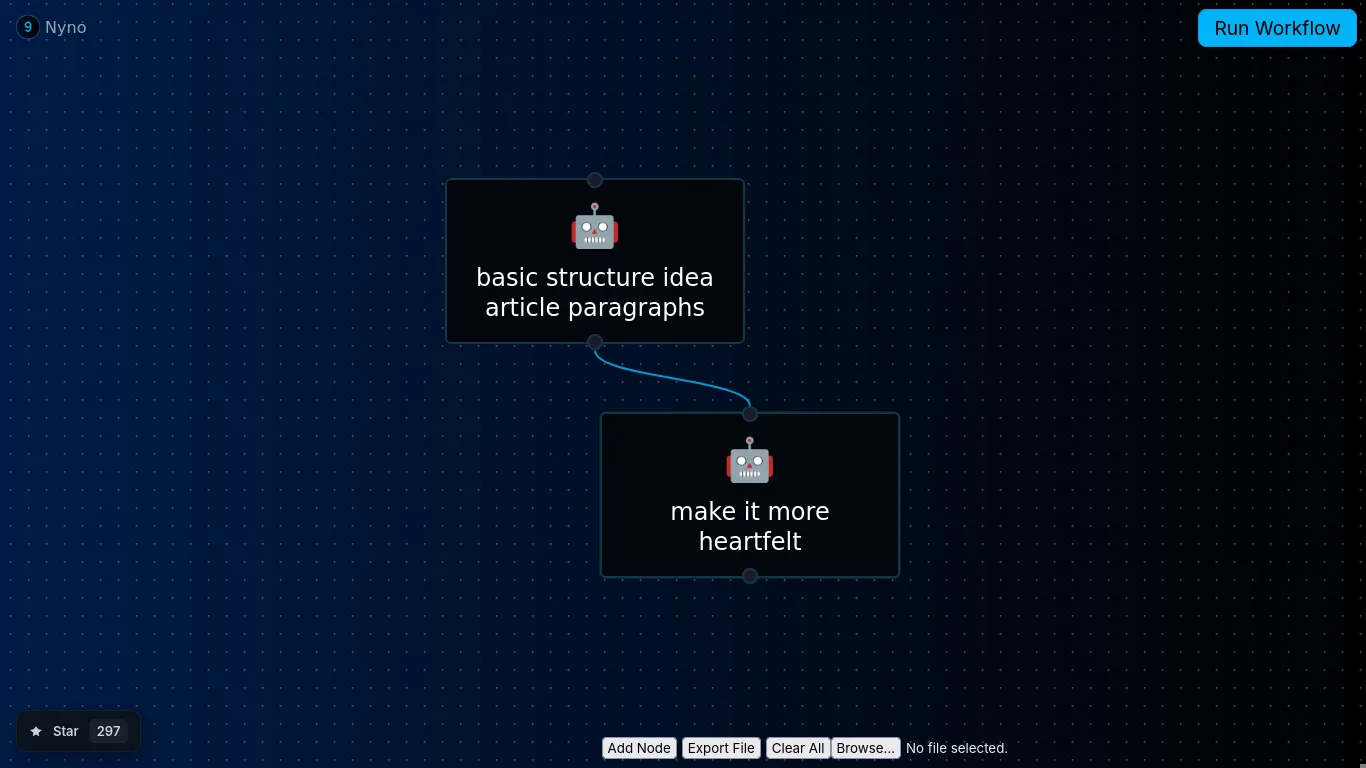
Once connected, data automatically flows from the previous node to the next.
The ${prev} Variable (Default)
By default, every step stores its output in ${prev}.
${prev}always contains the latest step’s output- The value can be any type: string, number, object, list, etc.
- Each step overwrites
${prev}unless configured otherwise
This makes simple, linear workflows easy to build with no extra configuration.
Custom Context Keys (set_context)
Steps also support writing their output to a custom context key instead of ${prev}.
Example:
context:
  set_context: my_last_http_request
This is useful when you need to:
- Keep multiple previous results
- Reuse older outputs later in the workflow
Using ${prev} in the Next Node
When a step runs, its output is stored in ${prev} by default.
For a file node, ${prev} contains the file contents. You can use this directly in the next step’s prompt.
Full Workflow Example
workflow:
  - step: nyno-file-read
    args:
      - /home/user/example.txt

  - step: ai-mistral-text
    args:
      - "Improve my file: ${prev}"
    context:
      MISTRAL_API_KEY: "key"
Result:
${prev} is replaced with the contents of example.txt and sent to the AI model.
Summary
- Nodes share data through a workflow context
${prev}is the default and simplest way to pass valuesset_contextallows advanced workflows with multiple variables- Visual connections automatically enable data flow